A photo is going viral: a politician in an unlikely place, a disaster scene, a celebrity endorsing a product, or a “real person” on a dating profile. Is it real? AI tools can now produce photorealistic images in seconds, and the old giveaways are fading fast. This guide shows you how to tell if an image is AI generated, which free AI image detector tools are worth using, and why checking the source matters more than any tool.
Why It Is Getting Harder to Tell
A couple of years ago, AI images were easy to spot: mangled hands, melted backgrounds and gibberish text. Newer image generators have fixed most of those problems. Many AI images now pass a casual glance, and some pass a careful one.
That matters because fake images are no longer just novelties. They are used to spread false news, sell products that do not exist, build fake profiles for romance and investment scams, and put real people in situations they were never in.
Visual Signs an Image Might Be AI Generated
None of these proves anything on its own, but several together are a strong hint. Zoom in, because most clues are in the details.
- Hands, teeth and ears. Look for extra or fused fingers, oddly shaped nails, teeth that blur together, or earrings that do not match.
- Text and signs. Writing on shop signs, posters, badges and clothing is often misspelled, warped or nonsense.
- Skin that is too perfect. AI faces often look airbrushed, with no pores, stray hairs or small blemishes, and with a glossy, slightly plastic finish.
- Light and shadows. Check whether shadows fall in the same direction, and whether reflections in windows, glasses and eyes match the scene.
- Backgrounds that fall apart. Background people may have distorted faces, and railings, tiles and patterns may bend, repeat or merge into each other.
- Things that do not add up. Objects that blend into each other, jewellery growing into skin, or glasses with no arms.
- An overall “too cinematic” look. Dramatic lighting, perfect composition and saturated colour in what is supposed to be a quick snapshot.
Remember that real photos can be edited, filtered or badly compressed, which creates some of the same oddities. Use these clues to decide what to check further, not to reach a verdict.
Checks That Work Better Than Looking
1. Search for the image’s origin
Run a reverse image search with Google Lens or TinEye. Upload the image or paste its link and look for the earliest and most credible place it appeared. A real news photo usually traces back to a photographer or a news agency. An AI image often first appears on a social account, an AI art forum, or nowhere earlier than the post you saw.
2. Use “About this image”
In Google Search and Google Lens, the “About this image” option shows when Google first saw an image, where else it has appeared, and any information the image carries about how it was made. Images made with Google’s own AI tools carry an invisible watermark called SynthID, which Google’s tools can detect.
3. Check for Content Credentials
Some AI tools, cameras and editing apps attach Content Credentials, a tamper-evident record of how an image was created and edited. You can upload an image at contentcredentials.org/verify to see whether it has one. A missing record proves nothing, because it is easily stripped, but a present one tells you a lot.
4. Look for platform labels
Facebook, Instagram, TikTok and YouTube label some AI-generated content, often as “AI info” or “Made with AI”. These labels only appear when the platform detects the image or the uploader admits it, so their absence does not mean an image is real.
5. Ask who benefits
Who posted it, and what do they want you to feel or do? Images designed to shock, flatter a cause or sell something deserve the most suspicion, especially if no reliable outlet is reporting the same thing.
Free AI Image Detectors, and Their Limits
Several free tools estimate whether an image is AI generated. Widely used options include Hive Moderation’s AI-generated content detector, AI or Not and Sightengine. You upload an image and get a probability score.
Use them as one signal among several, never as proof:
- They make mistakes both ways. They can label real photos as AI and miss AI images, especially from the newest generators.
- Small changes fool them. Cropping, screenshots, filters and compression can change the score a lot.
- Different tools disagree. If you use a detector, try two or three and treat a split result as “unknown”.
- Mind your privacy. Do not upload private photos of yourself or others to a free tool without checking what it does with them.
A detector answers “does this look AI-made?”. The more useful question is “where did this come from, and who stands behind it?”. Only source checking answers that.
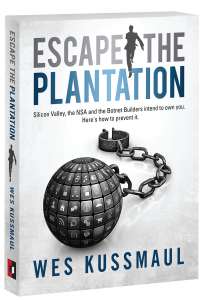
When images can no longer be trusted, the source has to be. Building that kind of trust online is the subject of Wes Kussmaul’s Escape the Plantation, and you can get a free copy at the end of this article.
Where Fake Images Do the Most Harm
- Breaking news. Fake photos of disasters, protests and wars spread fastest in the first hours, before real images and reporting catch up.
- Scams. Fake product photos, fake “proof” of investment returns, and AI faces on fake profiles for romance scams.
- Celebrity endorsements. Famous faces placed in adverts for products and schemes they have never heard of.
- Real people. Fake images of ordinary people, including fake explicit images, used to embarrass, harass or blackmail. If this has happened to you, our guide to deepfakes and what to do if it’s you sets out the steps.
Video is following the same path. For moving images, see how to tell if a video is AI generated.
A Simple Routine Before You Share
- Pause, especially if the image made you angry, frightened or delighted.
- Zoom in on hands, text, faces and background.
- Run a reverse image search to find where it started.
- Check “About this image” and Content Credentials if they are available.
- See whether a reliable outlet is showing the same image or reporting the same event.
- If you still cannot confirm it, do not share it, or share it clearly labelled as unverified.
Why Labels and Detectors Will Not Solve This Alone
Detectors are in an arms race they are likely to lose: every improvement in detection is followed by better generators. Labelling rules help, but as we found in AI Labelling Laws Are Here: Do They Actually Work?, they only work when the people making fakes cooperate.
The lasting answer is the other way round. Instead of trying to prove every fake is fake, genuine images need a way to prove they are genuine, signed by an identifiable, accountable source. Until then, the habits above are your best protection.
Frequently asked questions
How can I tell if an image is AI generated?
Zoom in on hands, text, skin and backgrounds for errors, then check the image’s origin with a reverse image search and Google’s “About this image”. Look for Content Credentials and platform AI labels. No single check is certain, so use several together.
Is there a free AI image detector?
Yes. Hive Moderation, AI or Not and Sightengine all offer free checks. They give a probability, not proof, and they can be wrong in both directions, so treat the result as one clue among several.
Are AI image detectors accurate?
Not reliably. They do better on older or unedited AI images, and worse on new generators, cropped images and screenshots. Two detectors can give opposite answers for the same picture.
Can Google tell if an image is AI?
Partly. “About this image” in Google Search and Lens shows an image’s history and any information it carries about how it was made, and Google can detect the SynthID watermark in images made with its own AI tools. It cannot reliably identify images made with every other tool.
What should I do if I find an AI-generated image of me?
Save evidence, report it to the platform, and ask Google to remove it from search results. If it is an intimate image, use StopNCII.org, or Take It Down for anyone under 18, and report it to the police.
Related reading
- What Is a Deepfake? How to Spot One and Protect Yourself
- Is This Video AI Generated? How to Check
- AI Labelling Laws Are Here: Do They Actually Work?
- How to Spot Fake News: The Tricks That Do the Work
When images can no longer be trusted, the source has to be. Wes Kussmaul’s Escape the Plantation explains why the internet has no reliable way to know who made or published anything, and how verified, accountable identity would let genuine content prove itself. Enter your email below to get your free copy and follow Goebbelsology’s work on spotting manipulation.